
User login

What is OpenID?
  • Log in using OpenID
  • Cancel OpenID login
  • Create new account
  • Request new password
Register
  • Home
  • Browse
    • 2D Art
    • 3D Art
    • Concept Art
    • Textures
    • Music
    • Sound Effects
    • Documents
    • Featured Tutorials
  • Submit Art
  • Collect
    • My Collections
    • Art Collections
  • Forums
  • FAQ
  • Leaderboards
    • All Time
      • Total Points
      • Comments
      • Favorites (All)
      • Favorites (2D)
      • Favorites (3D)
      • Favorites (Concept Art)
      • Favorites (Music)
      • Favorites (Sound)
      • Favorites (Textures)
    • Weekly
      • Total Points
      • Comments
      • Favorites (All)
      • Favorites (2D)
      • Favorites (3D)
      • Favorites (Concept Art)
      • Favorites (Music)
      • Favorites (Sound)
      • Favorites (Textures)
  • ❤ Donate
General Discussion

I How do I fix this????

Tozan
Wednesday, May 20, 2015 - 03:08

When I imported  the model into Unreal 3, (I decided to see if I could do it in unreal 3

before tackling unreal 4) the model size was five feet high (normal....)


But as Soon as I set up the game scripts to make the custom model

become the default pawn player in the game.


THen THIS happened:. 

My pawn Player went from 5 feet to over 100 feet tall !!!!!!!!!!!


How do I fix that issue?

Attachments: 
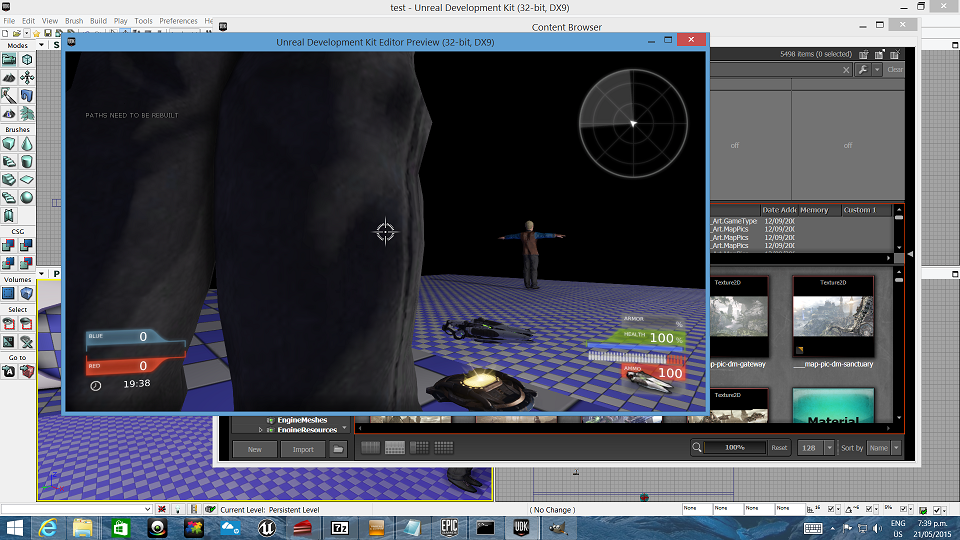
Preview
toobig.png toobig.png 579.5 Kb [1 download(s)]
  • Log in or register to post comments