
Zombie and Skeleton 32x48
Saturday, January 19, 2013 - 01:32
Collaborators:
Art Type:
License(s):

Collections:
- Don't list this collection in the archive RPG
- 01. Pixel Art - Characters
- 2D - RPG Characters
- 2D assets topview
- 2D Platformer Pixel Art
- 2D::Sprite::Orthogonal
- 3 Frame Walk Cycles
- 3/4 Directional Sprite Sets
- 32x32 CC0 JRPG-ish style
- Animated Sprites
- Animated top down creatures.
- C0 fantasy modern game
- CC0 resources
- CF Inspiration
- Dungeon Slayer Art
- enemies
- Enemies and characters (Pixel Art)
- Fairytale platformer
- pixel art
- Pixel Art - JRPG
- PLATAGO! Sir Blastalot Asset Pack
- Project A - Mobs
- QnD002 Assets
- Roguelike
- RPG Stuff Collection
- RPGBoss
- Top Down 2D JRPG 32x32 Characters Art Collection
- Top Down Fantasy RPG for Commercial Use
- Top-down 2D RPG
- Top-Down RPG (Orthographic)
- Use
- VTRS
- Zombie set
- Zombie SIR Model
Favorites:
82
Preview:
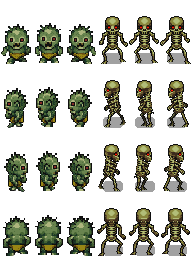
Original art done by Artisticdude. Images scaled to usable with 32x32 tiles and added walking animation.
File(s):
 zombie_n_skeleton2.png 19.4 Kb [9771 download(s)]
Comments
When scaling pixel art, you can't just resize it. It has to be done by hand. I'm afraid these are unusable.
So no scale image tool for pixel art? Even if smoothing is done by hand?
I added new version of skeleton. Now scaling is done by hand and plus added another version with simple shadow.
In Paint.net you can choose "Next neighbor" as the interpolation method within the rescaling menu.
This way you avoid the blurry effect. Makes it a bit easier, but you still have to do some work by hand.
hey, I'm developing a game, do I have your permition to use this sprite ? it's because I don't know how this site works, my game probably won't get more than a 100 downloads lol, but I just want to be sure everything's ok if I use this sprite
Yes you can. Each art here has listing of licenses which are selected by who made the art. You can choose one of those license and use it. Here is CC0 which means you can do what ever you like with this art. You can click of each license and see how you use them. CC-BY requires that you give attribution to whom made the art and so on.
Yes, I was taking a look at that, and I read that we have to give atribution to the person who made it, and I'm currently doing the credits section, I made the game with Construct2, Can I just add something like "2D art made by: Reemax at Opengameart.org ? because the license says that I must include a link, but I think I cannot do that in construct2, so please give me an example to quote you, thank you
CC0 does not require any attribution. So you do not need give any credits for me doing these zombies and skeleton. If you like you could say something like "Public domain graphics from Opengameart.org"
You probably read CC-BY license although I do not think that requires link either.
Thank you very much ! that's great!
I used the awesome sprites in my game! https://play.google.com/store/apps/details?id=com.NeonStreetGameStudios....
They're fantastic designs.