
Terrain Renderer

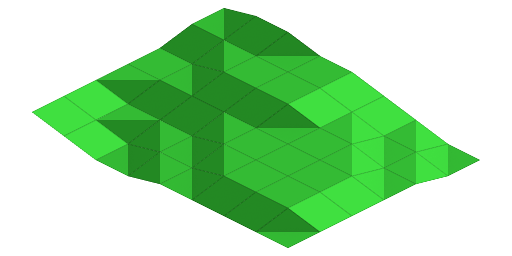


Here is a tiny set of terrain tiles with a tool (Blender file) to create more.
These tiles are for continuous terrain, where each vertex can only be 1 unit above/below nearby vertices.
Made per request here
Specs: the tiles are for a base grid size of 64x32. The tiles are 64x48 each, thus each step in elevation is 8 pixels. The first 4 tiles are the same, just rotated.
The shades of those angles aren't based on 3D light, they're self illuminated. Basically the lightest shade is the texture at 100% diffuse intensity, the medium shade is 66%, the dark shade is 33% (I simply made 3 materials with different diffuse intensity but the same texture).
During usage and in specific game engines, you might adjust some tiles up/down 8 pixels; depending on how the engine assumes tiles are vertically aligned.
Usage: Create a texture named "texture.png" and put it in the same folder as the terrain_tool.blend file. Open in Blender and click "Animation". It will create 22 tiles in a folder named "out".
I use this montage script to combine the 22 tiles into 1 sheet:
montage 0*.png -background "transparent" -geometry 64x48 -tile 4x6 terrain.png
(edit) Added two missing terrain options, thanks to Betalord for catching it and testing the results.
 texture_grass.png 209 b [1245 download(s)] texture_red.png 8.1 Kb [546 download(s)] texture_sand.png 8 Kb [422 download(s)]
 terrain_tool.blend 499.6 Kb [382 download(s)] tiles_grass.png 20.2 Kb [668 download(s)] tiles_red.png 60.7 Kb [346 download(s)] tiles_sand.png 64 Kb [368 download(s)]
- Log in to post comments
Comments
Thats really interesting, reminds me of populous. Can this be applied to an hex terrain as well?
Nice. Will you be making tutorial, how to render terrain with these tiles?
Delirius, do you mean
I meant, that i would like to know how to render terrain like in preview. If you are not planning to do tutorial on that, don't let my question hinder your progress wth Flare.
btw.: Flare is really nice project.
There is just one problem with this tileset: two types of tiles are missing, that ones that have two edges raised (opposite edges). For an example:
top-left: 0
top-right: 1
bottom-left: 1
bottom-right: 0
If you look here:
http://newgrf-specs.tt-wiki.net/wiki/NML:List_of_tile_slopes
Those would be tiles number 5 and 10, I believe.
Anyway, can you modify your tile pack to include those two? I'd really like to use it, but currently can't because of this flaw.
@Betalord good catch, I'll get this updated. Send me a private message here on OGA if you want to help me test the results? Thanks!
Updated this entry with the two missing tiles. Thanks Betalord for finding it and helping test the fix!
I also embedded instructions into the Blender file when it's opened.