
Isometric 64x64 Outside Tileset
Saturday, January 2, 2010 - 15:19
Art Type:
License(s):

Collections:
- 2D - Isometric Tiles
- 2D - Tiles 64x64
- 2D Art Free (Mostly Pixel Art)
- 2D game
- 2D::Tile::Isometric
- 2D::Tile::Orthogonal
- AA NF
- AHE24/WF
- Art used in Gigalomania
- Base pixel art for 3D pixelish RPG
- Best Isometric (iso, rhombus, diamond) Tilesets for Tilemaps
- Billys Revenge artwork
- BM Project
- DOS Ranger
- Golden Axe
- HQ 2D & Isometric
- Iso to-use
- Isometric
- Isometric Assets
- isometric rpg
- Isometric stuff
- Isometric Tactics Fantasy
- Isometric Tiles
- lichverse
- lichverse isometric
- Medicine's disordered list of Fantasy RPG Tilesets
- Morgan's Favorites
- My Project
- QuestTown prototype
- RTS Assets
- Stendhal
- survival
- TDDF
- Terrain transitions
- Tilesets and Backgrounds (PixelArt)
- Top Down 2D Isometric 32x32 Art Collection
- Trees: Mega Pack CC-BY 3.0
- Ultimate TableTop
- Viewpoint - Isometric Sprites
- window shopping
- Yar Tile Family
Favorites:
88
Preview:
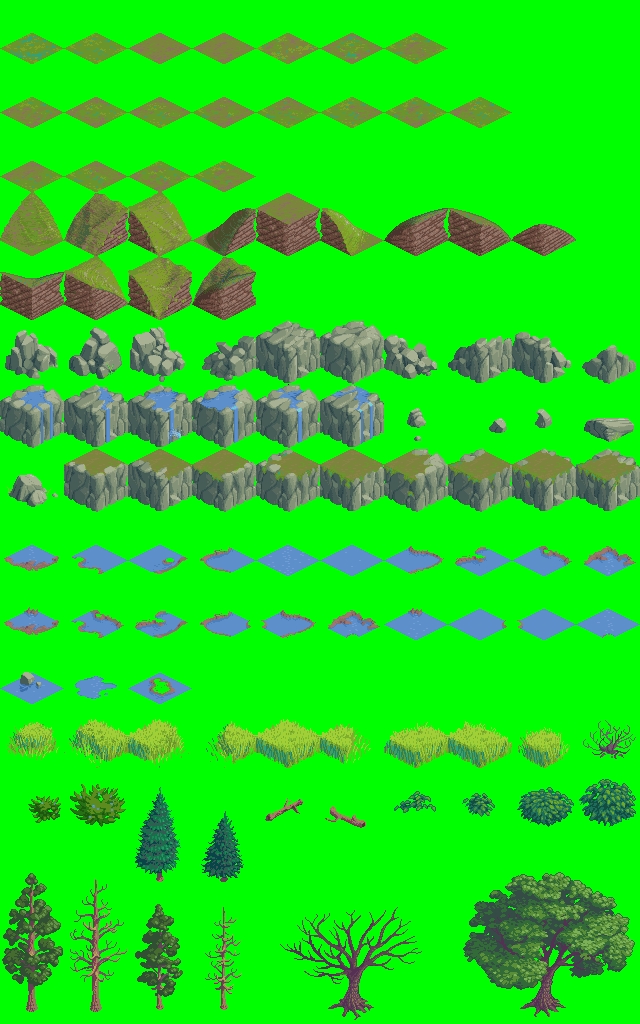
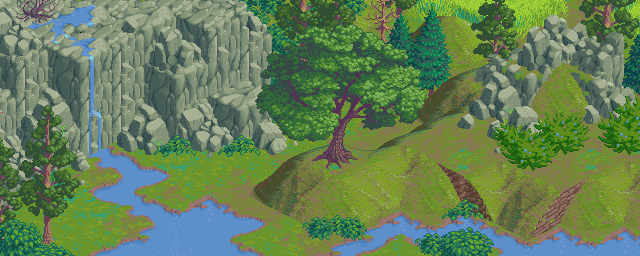
64 x 64 isometric pixel art tileset. Use, add to, or modify as you see fit - credit is appreciated.
File(s):
 iso-64x64-outside.png 62.6 Kb [17093 download(s)]
Comments
amazing!
Awesome work!
Tagged as Featured Art. :)
Bart
Awesome, thanks for posting !
Quite genuinely the best free iso work i've seen for a long time. A++
Very nice art ! That preview image looks amazing !.
This is really great! Beautiful artwork and invisible seams!
Really very nice, loads of usefull layouts possible.
I think someone is gonna fall in love with this, I can tell.
I made a quick java/processing sketch here:
http://www.openprocessing.org/visuals/?visualID=16704
(source from https://binarymillenium.googlecode.com/svn/trunk/processing/oga_tile)
It doesn't use all the tiles yet so the randomly generated landscape isn't as rich as your example picture.
Thanks for the great art!
Just wanted to add that THAT processing sketch of binarymillenium was what brought my attention t o OpenGameArt. Thanks to everybody involved!
Sorry to bring up this old post but im trying to use this tileset as an isometric tileset within Tiled and having issues, Any suggestions?
Depends on what issues you're having. Not having attempted it myself, I'd take a look at how tiled expects tiles to be arranged and see if the arrangement needs to be changed in some way. If you figure anything out, let me know. If you come up with an arrangement that works, we can post it here.
Maybe I'm just a noob, and I'm also a noob, but how do you download this stuff? It just takes me to a picture online of everything, which I don't really know how to use.
right click and save.. :)
how can i double favorite this?
SUPER-MEGA-AWESOME!!! I'll use it for my game!
This might seem like a noobish question, but what's the bet technique for cutting the sprites into individual files?
I prefer to use the imagemagick utilities. I'm posting with my phone at the moment so I can't conveniently figure out the exact command line though.
Also, depending on the engine you're using, sometimes you can just load the whole image and split it in your program.
I used imagemagick convert, I didn't write down the exact command line but the resulting tiles are here in subdirectories by type:
binarymillenium.googlecode.com/svn/trunk/processing/oga_tile
Very nice... these are too good to pass up! Thanks for the submission.
I used some of your trees in my game here:
http://www.kongregate.com/games/CuriousGaming/farm-and-grow
Very good work, thank you
I love this tileset!!! Here's a screenshot of my isometric map editor using this tileset. I hope you'll like it ;)
http://i50.tinypic.com/35mdzs3.png
Has anyone made a working TSX for this tile set? Alternatively, sultanofswing, is your map editor publicly available?
Tiled:
"The projection angle of an isometric map is determined by the tile
width and height you choose when creating the map.
The width and height you pick in the New Map dialog basically need to
match the base of your isometric tiles, not their full image (though
you should pick the full tile image size in the New Tileset dialog).
For the isometric example map, this meant tile width of 64 and tile
height of 32 pixels.
If you get small renderings errors at the edges of your tiles, this
could mean you're still one or two pixels off from how your tiles are
supposed to be used.
Best regards,
Bjørn"
source: https://groups.google.com/forum/?fromgroups=#!topic/mapeditor/U2ZjbuzlVhY
So for this tileset, when creating your new map, set the tile width to 64 and tile height to 32. When you create your new tile set, set the height and width both to 64.
Awesome tileset thank you for sharing it
Really beautifull tileset!
I've done am isometric render engine /map editor in javascript (HTML5), using your tileset.
You can see it here:
http://www.colxi.info/portfolio/javascript-isometric-map-rendering/
very nice work!
Maybe I'm a noob:
Which psoftware did you used for this nice preview?
I'm using tiled, but I'm not able to create some of that perfect images
Thanks for help,
xxy
For Tiled editor, you need to create a new map with 64x32 tiles, and then create a new tileset (e.g. TMX) from this image with 64x64 tiles. No offset, no padding, no spacing. Works great for me.
Thanks, Yar, for these great tiles! :)
Very nice work~~
Thanks you very much.
I use your arts in my game.
(Retaliation of Devils(ROD))
Sorry I am not good at English.
Thank you very much. Reworked the trees a little to use in Stendhal:
Hi, Yar! Some guy stole your art, badly repainted it and sells for money, without crediting you
https://www.gamedevmarket.net/member/clemanto/
I doubt that is you, since the quality of repaint is far below your skills.
Anyway, lovely tileset, I used it as placeholder, before switching to custom one.
@foxira8980: Yep, definitely Yar's tileset: https://www.gamedevmarket.net/asset/isometric-tileset-alien-city-1/
Hello Yar,
Thank you for sharing this verry nice tileset
I want to use this tileset in my game. and added maybe things sometimes
if i sell my game online can i use it?
In the image you can see how my game is going too look like
Greetings,
Seger
@SegerE: Since it's licensed CC-BY, you need to credit Yar in your game but there are no other restrictions that should prevent you from using the tileset commercially or otherwise. IANAL though, and you should seek proper legal advice before releasing your game.
@coldacid how do i seek proper legal advice? I creddit Yar already in my game
-Miraculously outstanding outlet for example, thanks.